Missing Partner details?

  • Modified on: Tue, 26 May, 2026 at 2:16 PM

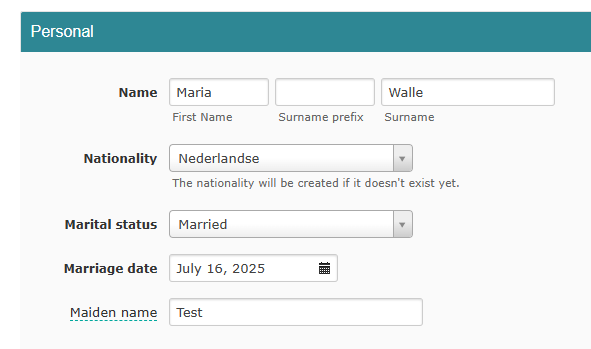
This happens because the marital status is set to "unmarried". As long as that is the case, you cannot enter partner details.


Here is how to fix it:

  1. Go to Employees
  2. Select the employee
  3. Click on Personal
  4. Change the marital status (e.g. to "married")
  5. Enter the wedding date
  6. Save

Now you can fill in the partner details in Family. ✅


Do you have a partner who is not married, but still want to add them?


You can add that person as an emergency contact.


Here is how:

  1. Go to the employee
  2. Click on HR
  3. Go to Emergency contacts
  4. Add the partner there

Did you find it helpful? Yes No

Send feedback
Sorry we couldn't be helpful. Help us improve this article with your feedback.

Contact Us

If you have question which are beyond this knowledgebase kindly contact us